The Curse of Forgetting
Qvink Memory and Why SillyTavern Summarize Extension Simply Isn’t Enough
When I first started using SillyTavern, I was truly taken aback by the number of options presented to the user compared to the broader market of AI-Chatbot websites. The flexibility of being able to tweak almost every single aspect of your experience is something that very little services offer (One of the closer ones being DreamGen). However, as my stories grew larger, and my tokens grew heftier (As will yours!), I began to research ways in which I could cut back on my tokenization in order to preserve my context. That’s when I discovered a third-party SillyTavern message summarize extension by qvink, called MessageSummarize. It has proven to be an invaluable tool when it comes to preserving memory over long, bigger-than-life narratives. Below are some brief explanations, as well as an in-depth guide to getting started. Let’s begin!
Where SillyTavern’s Summarizer Falls Short
SillyTavern’s built-in message summarize extension comes with one key caveat. If a key character detail or nuance was established mid-story, the summarizer may drop it entirely. This is because Summarization takes the entirety of your story and compresses it into a single, long summary, leading it to miss key details, such as specific character nuances or events. Unfortunately, the issue is exacerbated by AI’s “Lost in the Middle” phenomenon. LLMs naturally prioritize information in the beginning and at the end of the prompt. As a result, key story details in the middle are missed, which is an odd quirk. (Imagine only eating the buns off a burger!) Luckily, Qvink’s Message Summarize extension takes a different approach to solve this problem.
How Qvink Solves the Problem.
The way Qvink’s extension approaches this memory dilemma is different, but much more intuitive. Instead of summarizing the entirety of the story, it focuses on summarizing individual messages. This makes it much more accurate when it comes to remembering key details and character nuances. In fact, if you’ve used SpicyChat’s proprietary “Semantic Memory”, this will sound very familiar, as it is similar in principle. Memories from summarizing this way are very granular and moldable in essence. On top of that, you no longer need to re-summarize your entire prompt to capture key details. You only have to make changes to the specific message the events occurred in. You also have control over frequency at which summarization occurs. In fact, most users opt to summarize every 2-4 messages. Doing it this way increases quality and accuracy while sending fewer API calls.
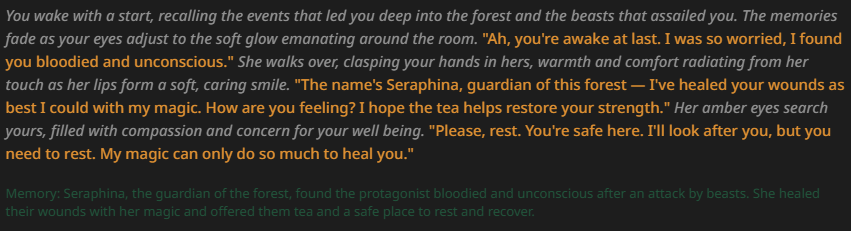
As you can see above, an entire paragraph was summarized into 1-3 sentences, emphasizing the important takeaways. This reduces token usage and allows context to be allocated to more important things, such as lorebooks (and if you want to simply lorebooks, check out my article covering bmen25124’s extension here!). You can also edit this memory directly, adding or removing details as desired.
Setting up Qvink’s SillyTavern Message Summarize Extension
The setup for Qvink is actually quite straightforward. Let’s get started.
- Locate the extension tab in your SillyTavern. (The three blocks, third to last at the top)
- Select the “Install extension” button in the top right corner.
- Copy and paste this link: https://github.com/qvink/SillyTavern-MessageSummarize
- Confirm the successful installation. You should be able to see it in the list of extensions under the name ‘Qvink Memory’
- Congratulations! Qvink should be successfully installed. However, you haven’t set up a proper profile just yet.
Implementing a Configuration Profile
Ideally, you do NOT want to use your default connection/completion preset for Qvink. It’s usually overkill for the simple task of summarizing. You want to use an LLM that is quick, efficient, and good at following instructions (Gemini 2.0/2.5 Flash come to mind). Reasoning is time-consuming and not needed. Personally, I use free LLMs available on OpenRouter. At the time of this article, I have used: 5 Best SillyTavern Extensions
You will find that certain models excel in certain ways. The best way to find out which model is ideal for you is to experiment! Weave different tales utilizing the available free models (or paid) and see how the LLM captures the details presented in your story. The three options I have provided above are fairly accurate, free, quick, (and did I mention free?), so don’t hesitate to try them all out. Once you make a selection, it’s time to make a Configuration Profile. For the sake of the guide, I’ll be using StepFun 3.5 Flash.
Bringing it all together
- Make a ‘Connection’ Profile under your API Connections tab.
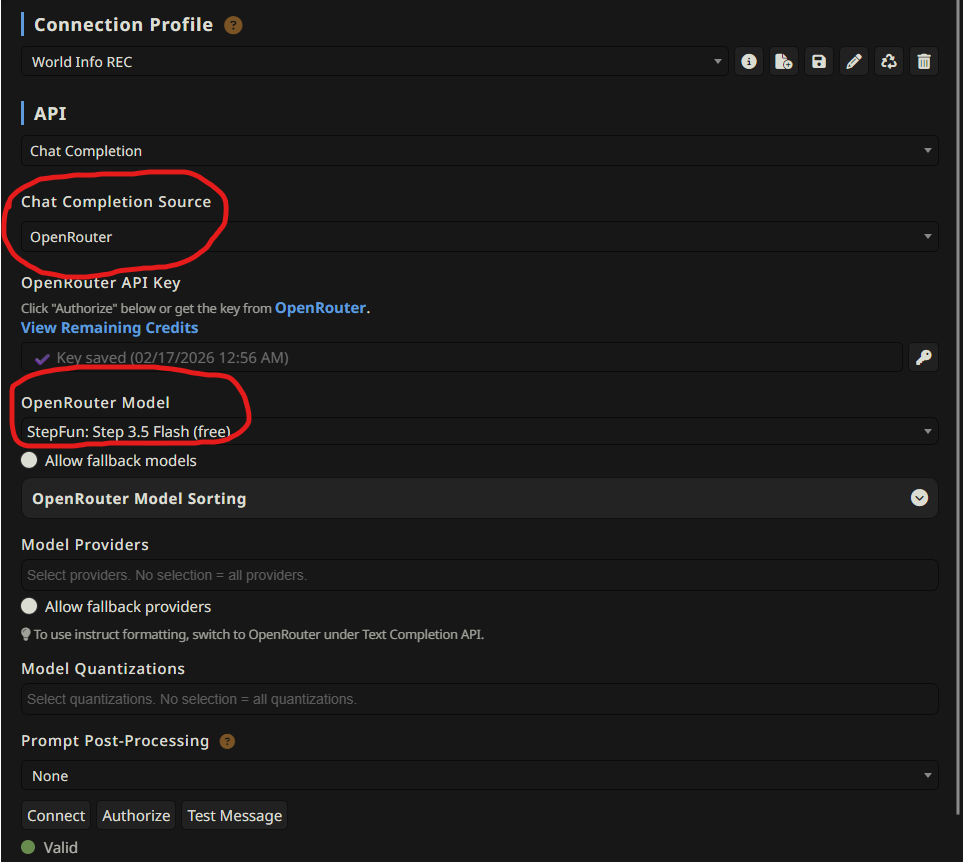
Make sure that the API key is properly applied, and a proper service/model is selected. The bottom should read (Valid), as shown above.
- Now it’s time to make a Chat Completion Preset under the “AI Response Configuration’ tab. The following are my settings:
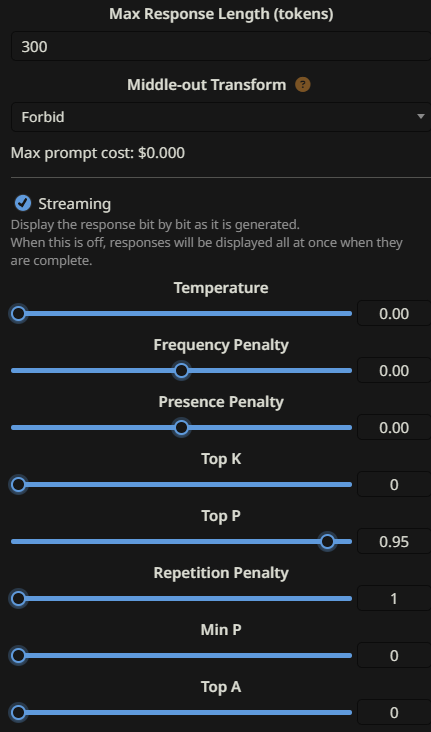
Note the information below:
- You do NOT need temperature. It should be at zero, because you only want strict, factual information taken directly from the message. Having the temperature be at zero or near zero forces the LLM to remain on task.
- Repetition Penalty at 1 is disabled. You don’t care if the model repeats for summarization, so keep it off.
- Set a comfortable max response length. For me, 300 tokens work.
- Head back over to your Qvink Memory extension tab and select the corresponding connection/completion preset. This ensures that your main, heavy Chat Completion preset is used to drive your story and do the lifting. Meanwhile, a lighter, faster LLM takes care of summarizing your messages.
NOTE – You may want to tick on the “Auto-connect to last server” option at the bottom of your API Connections tab. It ensures that, once the API switches to your Summarization preset, it automatically connects to your previous, main API. SillyTavern WorldInfo Recommender Extension by bmen25124
Conclusion
That should wrap up most of it. Much more detailed information can be found on Qvink’s github, including how to best configure the extension itself to fit your needs. If you’ve been looking for a reliable SillyTavern message summarize extension, Qvink’s tool is hands-down the best option available. Make sure to give him a big thank you for his incredible work.
FAQ
SillyTavern’s built-in summarizer compresses your entire story into one long summary, which often loses important mid-story details due to the “Lost in the Middle” LLM phenomenon. Qvink’s extension summarizes message-by-message, keeping memories granular and editable.
Fast, instruction-following models work best. Heavy reasoning models are overkill for summarization. Good free options on OpenRouter include StepFun Step 3.5 Flash, Arcee AI Trinity Large, and Meta Llama 3.3 70B Instruct (personally, I use StepFun Step 3.5.)
This can depend on your LLM. Most users summarize every 2–4 messages. This balances accuracy and API call frequency. Summarizing too often wastes calls, while summarizing too infrequently can let important details slip through. I personally summarize every 4 messages, but your mileage may vary depending on what LLM you use.
5 thoughts on “SillyTavern Message Summarize Extension: Qvink Memory”