The Grimoire – A Free AI Character Card Editor for Any Platform!

The Curse of Creating

So, here I am again. I find it somewhat inconvenient to build new character cards. Most platforms have a built-in editor, and some of them don’t. As a full-time simpleton, I need something easy to use, convenient, and full-featured. Most importantly, NOT tied to a platform. There’s plenty of AI character card tools out there, but I, (yours truly), decided to take a jab at it, as I found them a little lacking in some of the features I was seeking. As such, I am pleased to present you with…

The Grimoire!

What is The Grimoire, exactly?.. I shan’t conceal it any longer!

What Is It?! Another AI Character Card Editor?!

..Ahem. The Grimoire is a free (free indeed!), browser-based AI character card editor built for those. So no downloading, no installing, and nothing to setup or configure. It’s designed to be field by field, iteratively, with structure.

It supports V3 spec and exports both PNG and JSON, so don’t worry about what platform you’re using. As long as it’s able to read a standard-format character card, you’re golden. It’s not designed to be just a SillyTavern character card editor, even if that is my primary platform.

I designed it to be less of a generator, and more like a proper authoring environment. Character cards can be a personal thing, and I think that’s cool. I wanted the AI to actually assist, not takeover. Hence, any prompts sent are context-aware; factoring and inferring from the information you’ve already provided in other fields. It’s a pretty complete AI character card tool, with more planned.
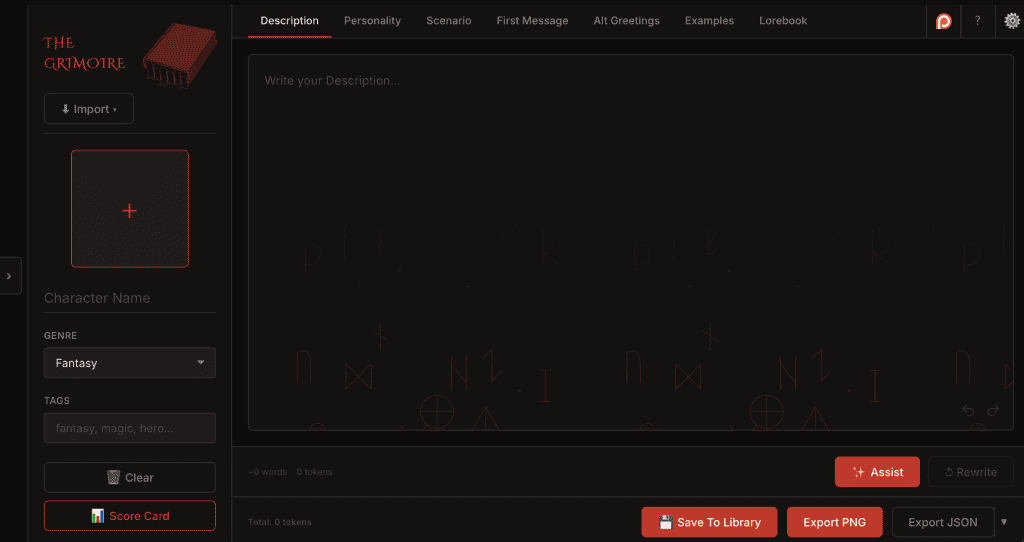
The Grimoire browser-based AI character card editor showing the lorebook editor tab

→ Try The Grimoire now at grimoire.rpfiend.com

Continue reading


SillyTavern Lorebook Extension – Scribe!

The Curse of Lorekeeping

Introducing a SillyTavern Lorebook Extension – Scribe!

Scribe is a personal little project I’ve been working on for a while. A SillyTavern lorebook extension for lazy people. I’m notoriously lazy. So much so that even when I use something like WorldInfo Recommender (which is great, by the way. Check my article on it here!), I still find myself too lazy to stop the story, open a menu, enter a prompt, and generate an entry. So I thought “Man, wouldn’t it be great to highlight a specific name, place, or entity, and simply make a lorebook entry without even having to open a menu?”. So I made Scribe! A lorebook editor that allows you to simply highlight text and create/update a lorebook entry.

How It Works

Scribe was designed for dummies, by a dummy. So it’s painfully simple to use. Listen up, dummy!

Continue reading

How to Install SillyTavern on Windows/Linux/Mac (Step-by-Step)

The Curse of Patience

I realize now after writing a few guides on SillyTavern that I never made one of the more important ones: Getting the damned thing up and running. Luckily, SillyTavern is supported among all operating systems (even Android, although that IS Linux-based but won’t be covered here). This is meant to be a catch-all, simple guide on how to install SillyTavern on any platform ya got. Without further dribble, let’s begin!

Requirements (The Boring Part)

Windows: Windows 10 or 11 (64-bit, and no Vista pls)

Mac: macOS 12 Monterey or later

Linux: Any modern distro (Ubuntu 22.04+ makes this even more cake)

Node.js v18.16+ (LTS) (Simply select your OS when you get it here!)

Git (optional but recommended on all platforms. Get it here!)

Continue reading

How To Write a SillyTavern Character Card

The Curse of Hollow

How To Write a SillyTavern Character Card (Or for any platform, really) That Actually Has Soul!

So if you’ve checked out my guide on how to write a system prompt (which if you haven’t, check it out here if you’re curious), then you might be wondering how to write a SillyTavern character card. If you haven’t written one before, I suggest you do! Writing your own character card with his/her own quirks and caveats is one of the most enjoyable things you can do in this space IMO. My first character cards were terrible. Straight copy and pasted from the Wiki page of whatever flavor-of-the-month anime I was into. I’d slap in 2-3 adjectives, and an equally terrible first message.

But that’s the Curse of Hollow. A character, a name, and a picture if you really tried. But no personality. Nobody’s home, Charlie. However, much like system prompts, the way you write and fill those fields can make a huge difference. It’s not so complex to call it prompt engineering (*tips fedora*), but knowing exactly how to structure it in order to achieve a desired result makes all the difference, and you’ll notice!

Continue reading

SillyTavern Story Suggestions Extension – Choices!

Introducing Choices!

Sometimes, you’re tapped out. It’s been a long day of work, a long day of chores, or a long day of nothing. Wouldn’t it be nice to just sit back and not have to think for once? SillyTavern Story Suggestions, or “Choices!” for short, is my love letter to address that issue (and before you say anything about the name, I’m not the most creative sort). It is a CYOA (choose-your-own-adventure) style extension that automatically generates one-click story suggestions for you. Instead of having to brainstorm and think of new ideas, the LLM thinks of them for you and your character acts out the option in a single click. So you no longer have to stop and think if you don’t want to. Now, you can let that sucker LLM do it for you while you sit back and… Consume. Create. Obsess.

Features

Now that the edginess is over, we can get to the more important details. Simply put, the purpose of this extension is to streamline the “What do I do now?” dilemma most hit at some point. Here’s some features, shamelessly taken directly from my github:

Continue reading

How to Write a System Prompt for AI Roleplay

The Curse of Prompts

If you’ve spent time in SillyTavern, you’ve seen the system prompt field…*shivers*. The lazy either leave the default in place (guilty..), paste something they found on Reddit (uh..guilty?), or dump a wall of instructions in and hope for the best (GUILTY!)

Yes, I was indeed guilty of all three.

inb4 “Just download a preset, bro”, because I surely am.

But for the curious, the system prompt is the most impactful piece of text in your entire setup. It sits at the top of every context window, sets the behavior for your LLM, and directly shapes every response you’ll ever get from a character card. That means that, many times, a well-written character card will actually suffer from a crappy system prompt (or..it might be a crappy card too. In that case, you’re double f’d)

This guide is a little bit of my experience, breaks down what a system prompt does, how to structure one for AI roleplay purposes, what to stop doing immediately, and sprinkled in with a bit of Chemical X. Let’s get into it!

Continue reading

GLM-4.7 Presets

GLM-4.7 – Stab’s Directive Hierarchy for SillyTavern and GLM-4.7 / Gemini 3.0

Link to Github Here!

Out of all the GLM-4.7 presets I’ve used so far, this is my go-to. I’m a big fan. It’s well-structured, and naturally amplifies the way GLM’s reasoning works; which is based off chain-of-thought (reasoning step-by-step). The preset has several ‘tiered’ rules, that GLM-4.7 naturally follows. The output is more deliberate and consistent (think of it like a DM reviewing notes before a session). The tiers are comprised of:

Continue reading

SillyTavern Lorebook Profiles Extension – LoreProfiles!

Introducing LoreProfiles!

As I used SillyTavern more and more, it was a bit annoying to constantly switch between lorebooks. Every time I switched to whatever character I decided to interact with that day, I had to remember the specific lorebook(s) for the scenario I was trying to achieve, and then manually toggle them. This got old fast! Remembering 3-5 lorebooks for different aspects of a story for different characters or scenarios became a headache. I couldn’t find a Sillytavern lorebook profiles extension that fit this niche use case, either.

The SillyTavern lorebook profiles extension (or LoreProfiles, for short) fixes that entirely. You create a profile, select the lorebooks for that profile, and save it. Therefore, a single click swaps your entire lorebook configuration instantly (to your global). So no more forgetting which lorebooks belonged to which character. And no more toggling 5 things on and 3 things off every time you switch scenarios.

Continue reading

Z.AI GLM-5 To Be Made Available to Lite Users

The Curse of… No, Wait! The Blessings are upon us!

On a day such as this, one could not have expected better news. Z.AI has announced that, over the next few weeks, GLM-5 should be made available to all lite users.

The email. Fresh and real. You can almost taste it.

I’m excited to experience the improvements GLM-5 has made over 4.7. The team at Z.AI has made note of the immense RP community behind their LLM, and have taken steps to cater to that community as well. Specifically, improvements on long-text consistency and complex character developments were noted. When I was reading some reddit posts on it, some users remarked how impressively natural the dialogue felt compared to GLM 4.7.

GLM-5 is a 744B MoE model, and creative writing is a noted improvement area over GLM-4.7. NC Bench scores GLM-5 at 83–88% on prose quality across fantasy, horror, literary fiction, and mystery scenarios, measuring things like avoiding passive voice, weak dialogue tags, and AI-isms. That’s a meaningful jump for immersive RP output. – Perplexity

I’m a big GLM fan, but I’m also a big saving money fan (as we all know, tokens cost money)! Z.AI’s Lite subscription is an incredible bang-for-your-buck, and is a great LLM for roleplaying purposes. It’s actually my go-to, and I’m still rocking GLM 4.7 daily. The announcement is a most joyous one, and I’ll be releasing content catered towards GLM-5 over the coming weeks as I get an opportunity to experiment further with the LLM.

Z.AI GLM-5 lite users rejoice!

**Note: If you’re looking for a suitable preset to be used with GLM-5/4.7, look no further. Check out my article on Stab’s Directive Hierarchy for SillyTavern and GLM-4.7 / Gemini 3.0

Character Card Recommendation: Beneath the Halo @sixthflipper

One of The Best SpicyChat Character Cards I’ve Played.

Image from @sixthflipper’s character card page. Check it out here.

Truly one of the best SpicyChat character cards experience I’ve ever had on the platform (with GLM 4.6, no less! Crazy to think we’re by GLM-5!)

Beneath the Halo’s premise is quite complex, and puts the main character (you!) in a predicament. You are a half-demon carrying your father’s mark, hiding in plain sight among a party of heroes. They barely trust you as is, and they each already have a suspicion of you. The prompt features four characters, each distinct with their own personality traits. The generic golden-boy hero paladin, a cleric who already hates you, and a pair of twins that whisper about you. Meanwhile, the brand your father marked you with sings to you at night. How long before the whispers get too loud?

This was one of the first character cards I played that truly got me hooked. It’s just something about the way the characters react to you that make it feel fleshed out and true to their personalities. It’s a typical anime trope, sure, but it’s done your way, and that makes all the difference. Don’t let the reviews fool you! This honestly one of the best SpicyChat character cards I’ve used. So stop wasting time, and come get isekai’d!

Check it out on SpicyChat by clicking here!