The Curse of Lorekeeping
Introducing a SillyTavern Lorebook Extension – Scribe!
Scribe is a personal little project I’ve been working on for a while. A SillyTavern lorebook extension for lazy people. I’m notoriously lazy. So much so that even when I use something like WorldInfo Recommender (which is great, by the way. Check my article on it here!), I still find myself too lazy to stop the story, open a menu, enter a prompt, and generate an entry. So I thought “Man, wouldn’t it be great to highlight a specific name, place, or entity, and simply make a lorebook entry without even having to open a menu?”. So I made Scribe! A lorebook editor that allows you to simply highlight text and create/update a lorebook entry.
How It Works
Scribe was designed for dummies, by a dummy. So it’s painfully simple to use. Listen up, dummy!
If you’re extracting lore:
- Highlight any name, place, or concept. Two small buttons appear.
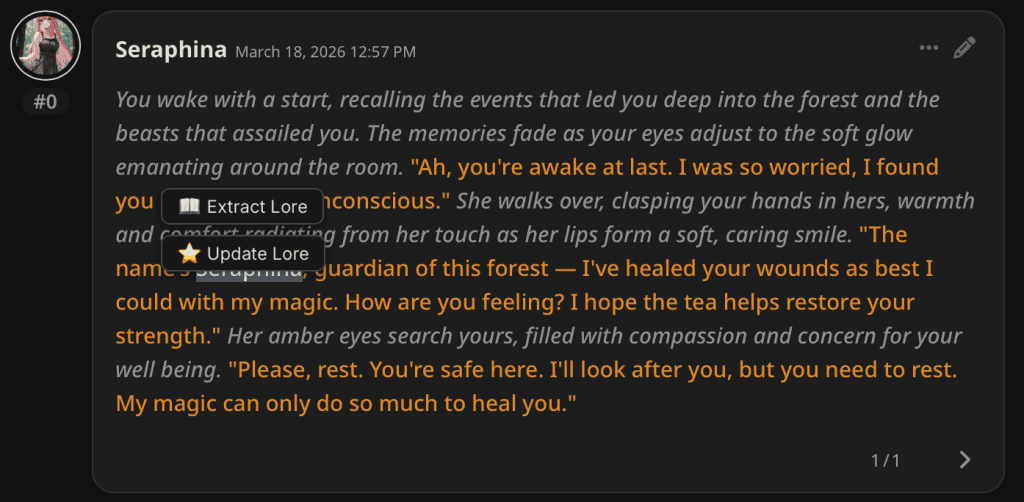
- Scribe attaches all relevant context that you selected in the extension menu, and drafts a complete lore entry by sending it to your model. It then hands it back to you for review before adding it to your lorebook.
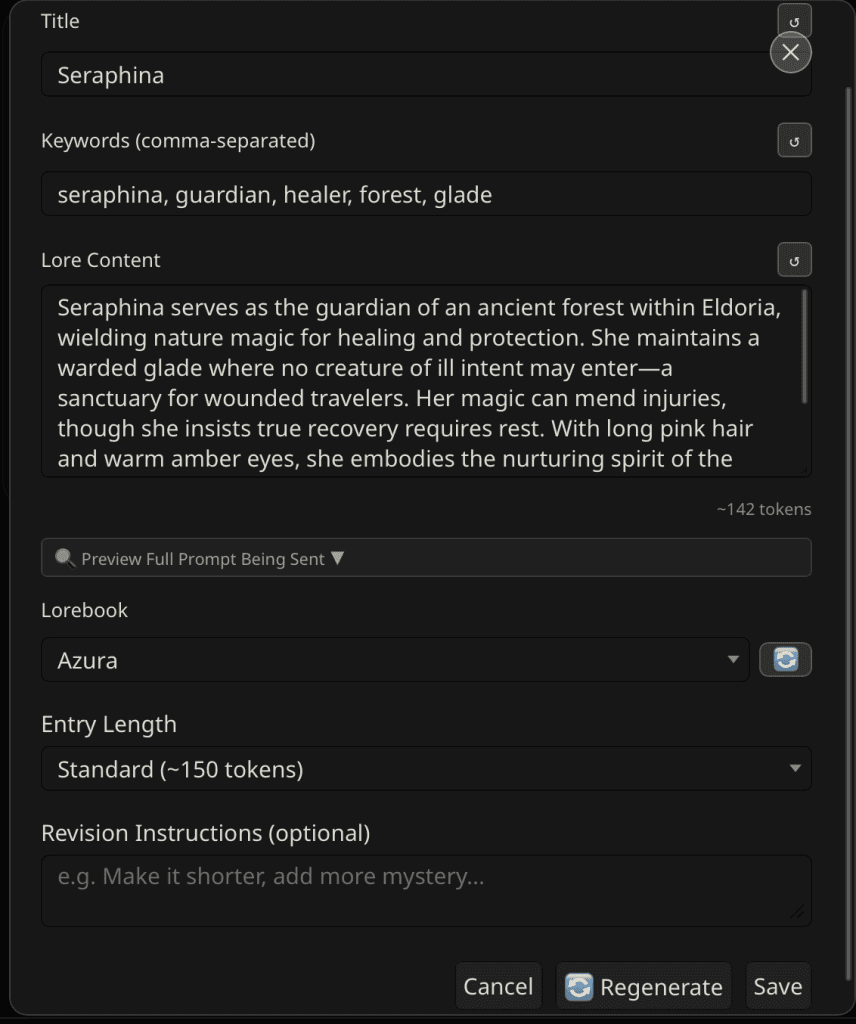
A little bit about this menu…
The Review Modal! You’ll get a list of options here. If you like the entry, you can save it immediately. Otherwise, you can adjust/regenerate the different fields by pressing the regenerate button next to each one (title, keywords, content), or just regenerate the entire entry by clicking the regenerate field at the bottom. You can also add revision instructions to this, which the model will account for when you regenerate.
Token-related features here: You can preview the amount of tokens (which is a rough estimate, every model is different), and you can adjust the entry length. You can also preview the full prompt being sent, which is helpful in determining exactly what’s being sent to the model (useful for debugging and token management!). Lastly, you can select what lorebook you’re submitting the entry to. This is useful for those with branching world-lines, playing different characters that intertwine in different ways. Lore from one story may be relevant in another. I.. should have probably put the features before I did all this yapping, huh? Onward!
Duplicate Detection and Merging
After every generation, Scribe checks your lorebook for similar entries. It won’t flag something unless both the title and at least one keyword match, so false positives do happen, but they aren’t common. If it finds something, a red banner shows up at the top of the modal. You can ignore it and save normally. Or you can expand the comparison to see the existing entry side by side with the new one.
From there, hit LLM Merge and the model combines both into a single draft. Review it in the proposed merge area. If you like it, Accept Merge and Save overwrites the existing entry.
If you’re in Update mode, the duplicate banner doesn’t show at all. You already know the entry exists. No need to be told twice.
If you’re updating lore…
- Highlight a text that already has a lorebook entry
- Click Update Lore
- Scribe finds the existing entry, drafts a revised version reflecting what’s changed in the story
- Review, save
Suggestions
Be specific with your highlights — character names, location names, faction names. A vague adjective gets you a vague entry
Use a lightweight model for Scribe’s connection profile — Because it’s just a SillyTavern lorebook extension, use something like a fast 7B or a cheap API tier. You’re drafting lore, not writing prose
The summary toggle gets better the deeper you go — in a long story, story context is everything. If you haven’t set up qvink’s MessageSummarize, now’s the time
Pair with LoreProfiles — once Scribe starts filling your lorebook, LoreProfiles keeps it organized by character, arc, or scene
FAQ
Scribe was built with mobile in mind. The floating button UI works on touchscreen just as well as desktop.
Yes. Use the Connection Profile setting to assign any configured API profile to Scribe, completely separate from your main chat model.
Yes, and it’s recommended. Enable the “Include story summary” toggle and Scribe will pull your current summary as context, making generated entries far more accurate.
Scribe saves to whichever lorebook you currently have active in SillyTavern’s World Info panel.
2 thoughts on “SillyTavern Lorebook Extension – Scribe!”