Introducing Choices!
Sometimes, you’re tapped out. It’s been a long day of work, a long day of chores, or a long day of nothing. Wouldn’t it be nice to just sit back and not have to think for once? SillyTavern Story Suggestions, or “Choices!” for short, is my love letter to address that issue (and before you say anything about the name, I’m not the most creative sort). It is a CYOA (choose-your-own-adventure) style extension that automatically generates one-click story suggestions for you. Instead of having to brainstorm and think of new ideas, the LLM thinks of them for you and your character acts out the option in a single click. So you no longer have to stop and think if you don’t want to. Now, you can let that sucker LLM do it for you while you sit back and… Consume. Create. Obsess.
Features
Now that the edginess is over, we can get to the more important details. Simply put, the purpose of this extension is to streamline the “What do I do now?” dilemma most hit at some point. Here’s some features, shamelessly taken directly from my github:
- Automatic suggestion generation: Choices appear automatically after every message.
- Multiple suggestions: Configurable number of suggestions per response (set in extension settings)
- One-click selection: Clicking a suggestion automatically submits with your chosen action
- Regenerate button: Includes a ↻ button to retry suggestion generation
- Persists across refresh: Suggestions are saved to the chat file and restored when you reload the page
- Abort-safe: If the API call is cancelled or interrupted by another extension, the extension detects it and retries automatically
- Compatible with other extensions: Designed to work alongside extensions like SillyTavern-MessageSummarize without conflicting API calls
- Wide LLM compatibility: Parses suggestions from XML tag format, numbered lists, and bullet points to support a broad range of models
- Configurable prompt: Fully customizable LLM prompt in settings so you can tailor to you.
- Adjustable response length: Control how long the response can be via the settings panel
- World Info/Author’s Note aware: Optional toggle to include WI/AN context when generating suggestions (so use WorldInfo Recommender to your hearts content!)
That’s pretty much it, though there’s more in the works.
Installation
Installing SillyTavern Story Suggestions Extension – Choices! is pretty much the same as any other extension:
- Open SillyTavern in your browser.
- Go to Extensions → Install Extension from the top menu.
- Paste the GitHub URL of the SillyTavern – Choices! repository into the install field.
- Confirm the installation and wait for SillyTavern to finish pulling the files.
- Restart SillyTavern to ensure the extension is fully loaded.
After the restart, (or probably right after installing), Choices! will appear in your Extensions panel.
How to Use the Choices! Extension
Once installed, using Choices! is shamefully simple:
- Open your chat and enable SillyTavern – Choices! in the Extensions panel (should be on by default)
- Continue as normal and send a message.
- When the AI replies, a set of story suggestion buttons will automatically appear under the message using your base completion profile.
- Click a suggestion to instantly have it play out in the story.
- If you want to request suggestions manually at any time, type the
/cyoacommand in the chat input and send it, or hit “Generate” when prompted. - ???
- Profit!
You can toggle the extension on or off at any point from the Extensions panel.
Settings and Customization
The power of Choices! comes from its settings.
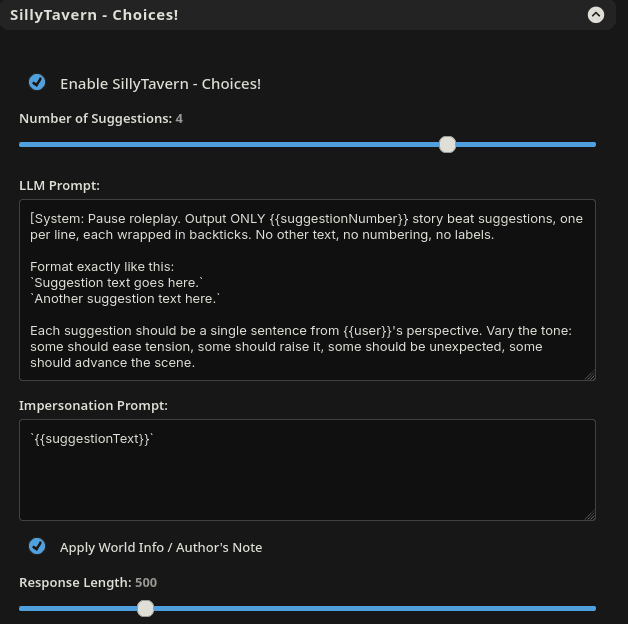
- Enable/Disable toggle quickly turns the extension on or off for the current session without uninstalling it.
- Number of suggestions (1–5) decides how many options you want each time. One suggestion keeps the story streamlined, while up to five can turn every scene into a branching CYOA.
- LLM prompt is the base prompt used to generate your story suggestions. You can customize it to request. Example, “short, high‑impact actions,” “romantic options,” “tactical combat decisions,” or anything else that fits your genre.
- Impersonation prompt controls how your chosen action is written when it’s sent to the model. This can define POV, tense, and style (e.g., first‑person present tense internal monologue, or third‑person descriptive narration).
- Apply World Info / Author’s Note toggle enable this if you want Choices! to consider your World Info entries and Author’s Note while generating suggestions, tying options more tightly to existing lore, relationships, and ongoing plot threads.
- Response length slider adjusts how long the suggestion generation response is allowed to be. Shorter outputs keep buttons concise and scannable, while longer outputs can include more descriptive, flavorful choices.
Best Practices
- Tune the LLM prompt to your genre
This isn’t mandatory, but it does help. If you’re aiming for dark fantasy, you might ask for morally ambiguous choices. For slice‑of‑life romance, you might ask for gentle, character‑focused options. Or just use the default, because this is meant to be lazy and not tedious! - Impersonation prompt for consistency
If you change this, make sure the character’s actions are always phrased in the same voice and tense. That way, drift is reduced. - Leverage World Info and AN
If you have more tokens than sense, enable World Info/AN awareness so the suggestions stay grounded in your setting. For something leaner, you can disable it to keep responses lighter and faster. For now, this runs off your default, so it can be slower depending on your LLM. - Regenerate when in doubt
Don’t be afraid to mash that like butto- I mean, that ↻ regenerate button if a set of suggestions misses the mood. One or two regenerations will usually surface something that perfectly fits. The terrible joke that comes at least once per post won’t come with it, I promise.
Conclusion. For now..?
Thanks for reading! If it sounds appealing to you (which it should),
Check it out here!
If you encounter any bugs or issues, feel free to reach out via comment or github.
FAQ
Yes. Choices! is designed to play nicely with other extensions, including tools that also make API calls, such as message summarizers or automation helpers. It detects interruptions and retries when needed instead of breaking the flow. If you encounter any issues with another extension, reach out here or github. I’ll happily check it out.
Yes. The extension parses suggestions from several common output formats. XML tags, numbered lists, and bullet points, so it can read and convert structured answers from a wide variety. Unless it outputs in elvish. Then maybe it’s time to move on.
No. You can disable the automatic behavior and just rely on the /cyoa command if you prefer on demand rather than after every message.
The golden question. It can, if you’re throwing a heavy default profile, WI, and AN at it every prompt. That can add up fast. In that case, I recommended using /cyoa to do it manually. Eventually, I’ll add the ability to pick from a different completion profile.
Ummm put up the github link so people who find this site can find your extensions….
Thanks for the suggestion! Modified it accordingly!