The Curse of Creating
So, here I am again. I find it somewhat inconvenient to build new character cards. Most platforms have a built-in editor, and some of them don’t. As a full-time simpleton, I need something easy to use, convenient, and full-featured. Most importantly, NOT tied to a platform. There’s plenty of AI character card tools out there, but I, (yours truly), decided to take a jab at it, as I found them a little lacking in some of the features I was seeking. As such, I am pleased to present you with…
The Grimoire!
What is The Grimoire, exactly?.. I shan’t conceal it any longer!
What Is It?! Another AI Character Card Editor?!
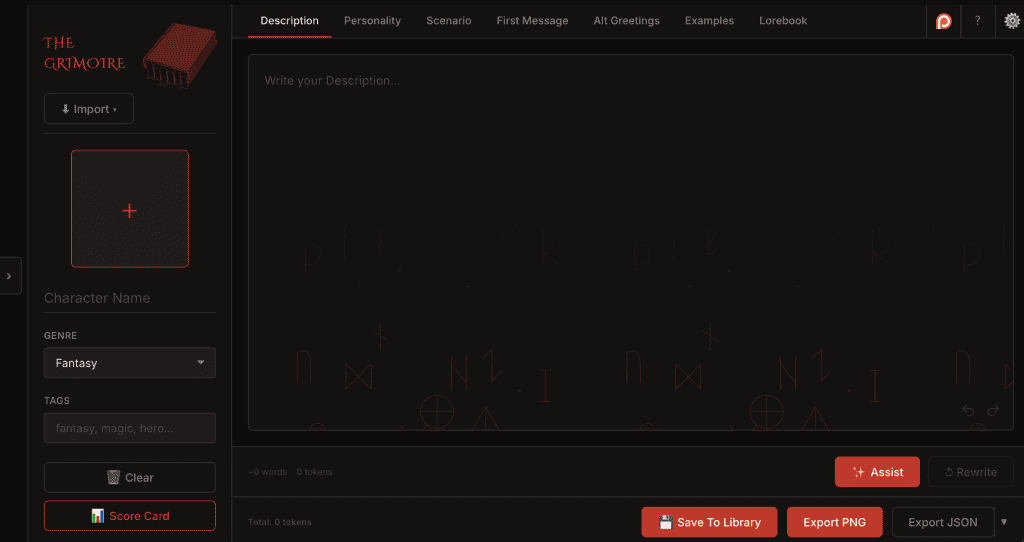
..Ahem. The Grimoire is a free (free indeed!), browser-based AI character card editor built for those. So no downloading, no installing, and nothing to setup or configure. It’s designed to be field by field, iteratively, with structure.
It supports V3 spec and exports both PNG and JSON, so don’t worry about what platform you’re using. As long as it’s able to read a standard-format character card, you’re golden. It’s not designed to be just a SillyTavern character card editor, even if that is my primary platform.
I designed it to be less of a generator, and more like a proper authoring environment. Character cards can be a personal thing, and I think that’s cool. I wanted the AI to actually assist, not takeover. Hence, any prompts sent are context-aware; factoring and inferring from the information you’ve already provided in other fields. It’s a pretty complete AI character card tool, with more planned.
→ Try The Grimoire now at grimoire.rpfiend.com
What It Does
So far, this is what’s available in v1:
AI-Assisted Field Editing (Not AI-Led!)
Every major card field has AI actions baked right in: Assist and Rewrite. These are context-aware, meaning the AI knows what field it’s working in and what’s already in the card when it gives you a suggestion.
The key word there is suggestion. The Grimoire is built on the assumption that you know your character better than the model does (duh!). It’s there to unstick you when you need it.
You plug in your own OpenRouter API key, so you’re always in control of what model you’re using and what you’re spending. There are plenty of free models, though.
Structured Managers for the Stuff That Gets Messy
Alt Greetings and Example Dialogue both get their own dedicated managers instead of being jammed into a single text block. Add entries, reorder them, expand and collapse, duplicate, delete. It’s all there, organized like it should be.
The Lorebook Editor
This one’s a big deal for me. The Grimoire includes a character-attached lorebook editor online, in your browser, that reads and writes directly to the character_book field in the CC V3 spec. Most AI character card editor don’t have it.
You can create entries with keys, secondary keys, content, insertion order, regex support, constant flags. And because it’s built with open compatibility in mind for other platforms, unknown fields from imported cards are preserved through the round-trip instead of getting wiped. You can import a card from somewhere else, open it in The Grimoire, edit a few entries, and export it back without losing anything it came in with (theoretically, right? Report bugs, people!)
Cloud Importing
You can cloud import a character card via link from 7 sources!
PNG and JSON Export
Export to PNG (with metadata embedded) or JSON. Both formats comply with the CC V3 spec.
Library, Autosave, and Undo/Redo
Your cards save automatically as you work. There’s a local library to manage multiple cards. Undo and redo work the way you’d expect. None of this is glamorous, but all of it matters when you’re deep and accidentally nuke a paragraph.
Avatar Upload and Crop with Preview
Upload an avatar, crop it in-browser, done. No external tools required. You can zoom into an image by hovering over it.
Local Card Library
You can save any character card you make or any that you import straight into your local browser storage (IndexdDB)
Genre
Select a genre to help guide the model into a certain line of thinking when assisting by selecting the relevant genre.
Score Card
This one was just for fun, but I added a scoring card system that will actually grade your card based on a rubric. Whatever it says is false, though. All character cards are 10/10s and muh waifu.
What Makes It Different
There are other character card makers out there, but I didn’t want this to be just another AI character card tool. Some generate cards in one click. Maybe some are built into platforms. Perhaps some are basic field editors with no AI. And.. a few do both.
The Grimoire’s angle is simple: it’s an authoring tool first, and an AI tool second.
That means the editing experience is the main event. The AI is there to help when you’re stuck, not to sit in the driver’s seat (Unless you want to. It can self-drive too!). Structure matters, so your greetings, examples, and lorebook entries all get proper management instead of living in one textbox.
Give It a Try
The Grimoire is live right now at grimoire.rpfiend.com. It’s free to use. You bring your OpenRouter key, and the rest is yours.
If you build AI character cards and want a cleaner, more structured way to write and manage them with an AI character card editor, this was built for you. If you user the default SillyTavern character card editor, I shed tears for you. Come break it, tell me what’s wrong, and let’s make it better.
Consume. Create. Obsess.
— RP|Fiend
More tools, guides, and rabbit holes at rpfiend.com.